
Overview
Every component of an
hydraulic system has physical dimensions and other
properties that influence its hydraulic behaviour. When
you draw an object on the ARTS design sheet you are
essentially creating a virtual version of a real world
object. For example, once you draw a pipe on the screen
you can then display its properties. Every hydraulic
object that is placed on the design sheet has properties
associated with it. These properties are accessible via
dialog boxes known as Property Pages. If you look at the
ARTS property pages of a pipe, you will find that the
pipe has a length and a diameter associated with it, as
well as other parameters relevant to its hydraulic
performance. The same holds true for all other objects.
Thus, the system drawn on the design sheet is not just a
bare graphic, such as a similar image drawn on paper, but
is backed up by a full complement of parameter values.
These values can be readily edited, thereby replacing the
initial values with actual values of the pipe you are
modelling.


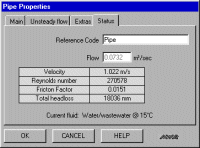
Pipe property pages
Property pages come replete with graphic images, object shape options (circular or rectangular sedimentation tank, channel shape, etc.), editable initial parameter values, and, most importantly, a comprehensive computational capability related to the internal hydraulic behaviour of the object. Property pages also include scaled interactive graphics and tooltips which display the range within a particular parameter can be changed, providing a quicker, easier and more accurate method of data entry. The object's full range of properties pages can be accessed by clicking the tabs located at the top of the properties page. The tab order generally reflects the required sequence of data input by the user.
Typical examples of object property pages are shown above and below:


Pump property pages
It will be noted that the Head property page for a pump (above) is in the form of a graph of head (H) as a function of flow (Q). This curve is generated by ARTS from the H/Q values entered for three points on the curve. The user selects each point, in turn, edits its values and then clicks on the Recalculate Curve button; ARTS replots the H/Q curve. The Power and NPSH characteristic curves for pumps are entered in the same manner.
The use of the
property page technique for data input simplifies the
process and makes it more reliable and less
time-consuming. With this method, it is very easy to
evaluate the influence of each parameter on the hydraulic
behaviour under evaluation. The user simply edits a
single parameter value and re-runs the analysis. For
example, if it required to determine the influence of
varying pump speed on the performance of a booster pump
in a pipe network, the user has only to edit the pump
speed value on the main property page for the pump and
then re-run the analysis.

