Flumes
and weirs
ARTS incorporates an
easy-to-use design capability for flumes and weirs. The
range of flumes catered for includes long-throated flumes
of rectangular, trapezoidal and U-shaped section,
short-throated flumes of rectangular section, and
Parshall flumes. The range of weirs includes
broad-crested weirs and thin plate weirs, including
proportional flow weirs, rectangular notch and V-notch
weirs.
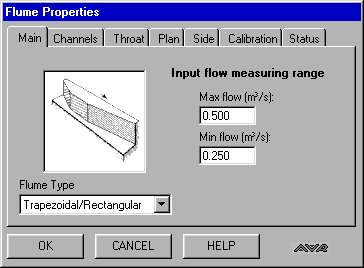
The procedure for designing a trapezoidal flume consists
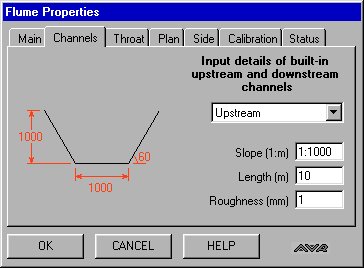
of editing the sequence of property pages for the Flume
object, as illustrated on (a) - (g), inclusive.
The Main tab (a) is used for flume type selection and
setting the design flow range. This is followed in
sequence by the channels tab (b), which is used for entry
of data relating to the channel into which the flume is
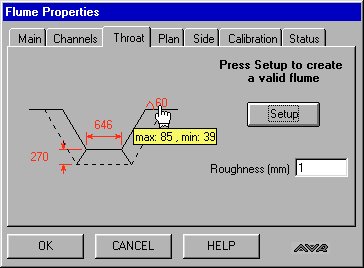
inserted. The third tab (c) is the design page for the
throat dimensions. When the user clicks the Setup button
on this page, ARTS presents the user with a compliant
initial design for the flume throat. The user can then
edit the throat dimensions, as desired, subject to the
constraint of remaining in compliance with flume design
criteria. ARTS provides guidance to the user in this
respect through its tooltip feature, which displays the
permissible value range for the parameter being edited,
based on the current values of the remaining parameters,
as illustrated below:
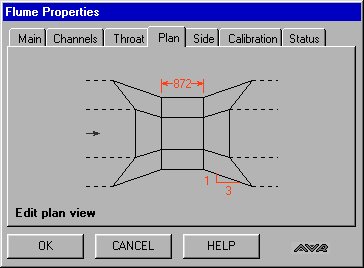
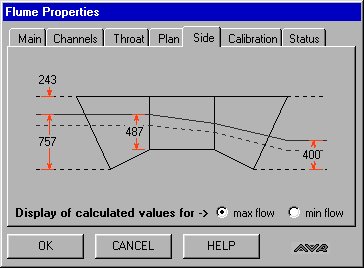
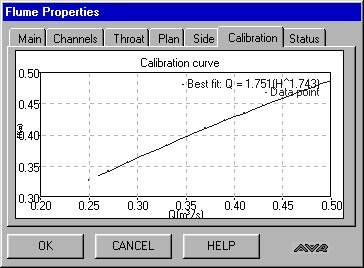
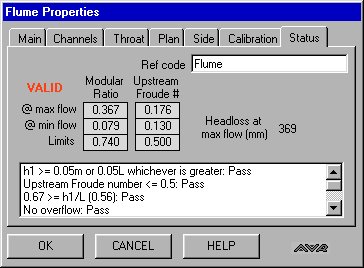
The Plan property page
(d) is used to specify the throat length and downstream
expansion slope. ARTS provides tooltip guide limit ranges
for these parameters. The Side property page (e) is used
to display water levels across the flume at maximum and
minimum flow values. The Calibration property page (f)
shows the calibration curve for the flume and the
corresponding fitted Head/Discharge equation. The Status
property page (g) records data related to the design
compliance of the flume and also displays the head loss
across the flume at maximum flow.
Weir design is carried out by following a sequence of
property pages similar to those illustrated above.

